Komprimer PNG og krymp bilder raskt uten kvalitetstap
I 2026 er den mest effektive metoden for å komprimere PNG og krympe et bilde raskt uten kvalitetstap å bruke nettlesernative WebAssembly- (Wasm-) verktøy som iKit for privat, lokal behandling. For best resultat bruker du «lossy-kvantisering» (Lossy Quantization) for å redusere paletten til 8-bit (rundt 80% besparelse), eller oxipng for tapsfri optimalisering, som fjerner skjulte metadata og optimaliserer DEFLATE-filtre uten å endre en eneste piksel.
2026-standarden: Hvordan komprimere en PNG raskt og trygt?
Innen 2026 handler bildeoptimalisering om mer enn å frigjøre diskplass — det er et krav for å forbli synlig i søkerangeringene. Ifølge SammaPix er Largest Contentful Paint (LCP), en nøkkelmåling for hastighet, et bilde på 70% av alle nettsider. Store PNG-filer bremser denne målingen, noe som skader brukeropplevelsen og senker SEO-posisjonen din.
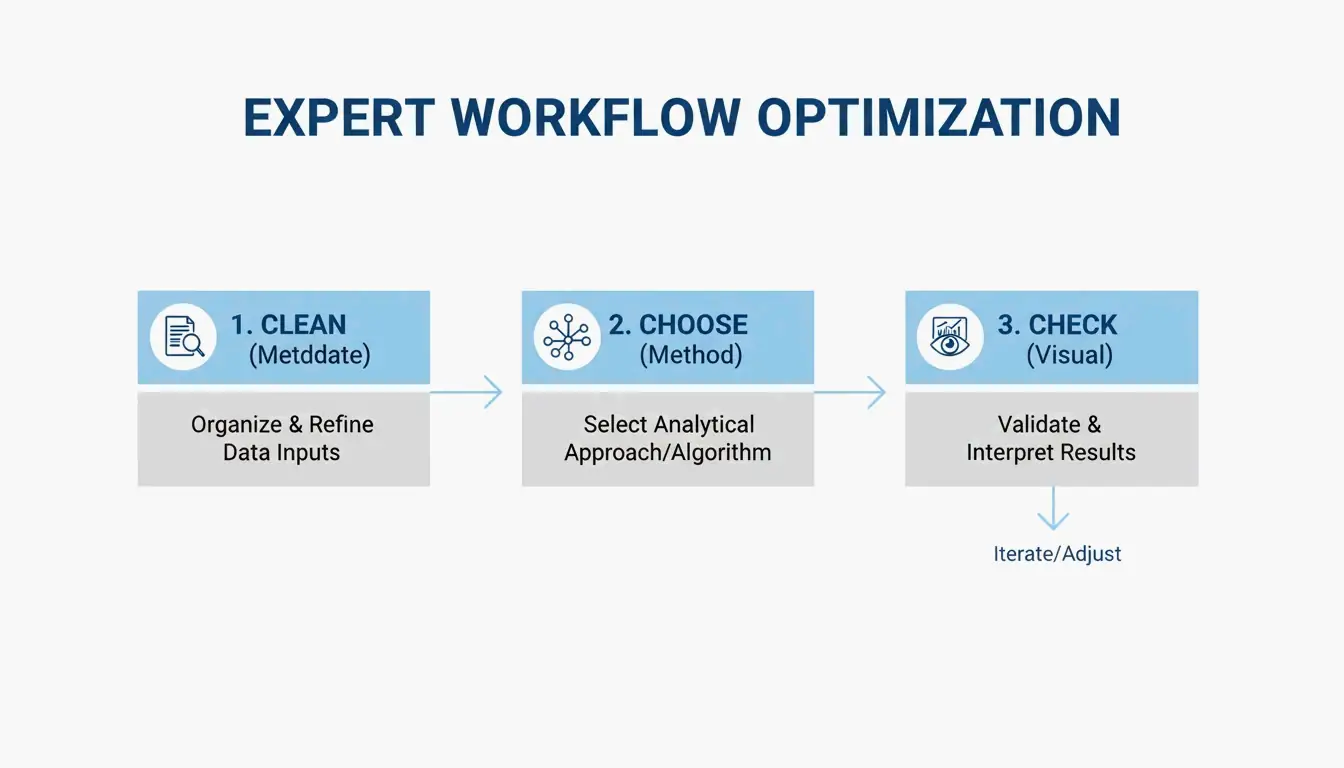
For å få den beste balansen mellom hastighet og skarphet følger fagfolk vanligvis denne tretrinnsarbeidsflyten:
- Fjern metadata: slett skjulte EXIF-data og unødvendige fargeprofiler.
- Velg metode: bestem deg for «tapsfri» (pikselperfekt) eller «lossy-kvantisering» (visuelt identisk, men mye mindre).
- Visuell kontroll: bruk side-om-side-sammenligningsverktøy for å sikre at bildet fremdeles ser skarpt ut før du trykker «publiser».
Arbeidsflyt «uten opplasting»: Umiddelbare resultater med Wasm
Dagene med å laste opp sensitive filer til en ekstern server for komprimering er i stor grad forbi. Moderne verktøy som iKit og ToolTea bruker WebAssembly (Wasm) for å gjøre alt tungt arbeid lokalt i nettleserens minne. Denne tilnærmingen «uten opplasting» betyr at dine private skjermbilder eller interne bedriftsdokumenter aldri forlater datamaskinen din, noe som gir deg både raskere behandling og bedre personvern.
Å rydde opp i metadata er den enkleste «raske gevinsten» her. Som iKit påpeker, kan ekstra data som Photoshop legger til en fil utgjøre opptil 200 KB med oppblåsthet — informasjon som ikke gjør noe for noen som ser på bildet på et nettsted.
Tapsfri vs lossy (kvantisering): Hva bør du velge?
Å velge riktig verktøy starter med å forstå hvordan PNG-formatet faktisk fungerer.
Tapsfri optimalisering (Lossless Optimization) fokuserer på matematikken bak filen. Verktøy som oxipng prøver ulike filterkombinasjoner (None, Sub, Up, Average, Paeth) for å lagre bildedataene dine mer effektivt. De endrer ikke pikslene i det hele tatt; de finner bare en smartere måte å pakke dem på. Du kan også bruke Zopfli-koderen for enda mindre filer, selv om behandlingen tar mye lengre tid.
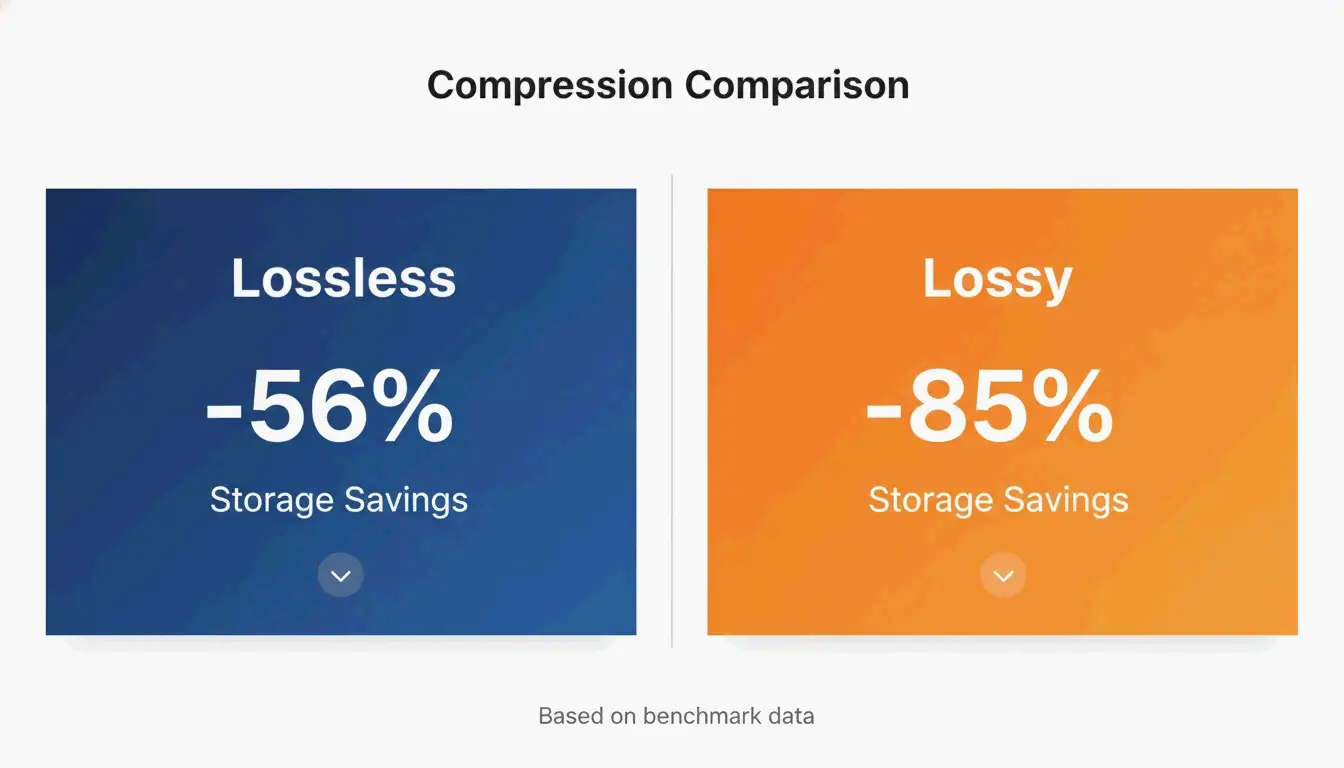
«Lossy-kvantisering» (Lossy Quantization) (ofte kalt 8-bit indeksert farge) endrer faktisk bildedataene, men på en måte du vanligvis ikke kan se. De fleste rå PNG-er er 24-bit eller 32-bit, noe som betyr at de støtter millioner av farger. Kvantisering komprimerer dette til en palett på 256 farger. Ifølge en UI-skjermbildemåling fra iKit sparer tapsfri optimalisering rundt 56% på UI-bilder, mens lossy-kvantisering kan kutte filstørrelsene med 85% uten noen synlig forskjell for det blotte øye.
Visuell inspeksjonsguide: Oppdage artefakter i graderinger og tekst
Når du presser komprimeringen til grensen, se etter bestemte feil. I jevne områder som en blå himmel eller en uskarp bakgrunn kan aggressiv kvantisering forårsake «banding» — der du ser tydelige striper i stedet for en jevn overgang. Det gode nyttet er at i motsetning til JPEG-er, som blir «uskarpe» eller «støyende» rundt tekst, holder PNG-kvantisering linjer og kanter knivskarpe. Ifølge SimpleResizer bør du, hvis du jobber med grafikk som har veldig tynne fargelinjer, bruke 4:4:4-kromasubsampling for å forhindre at farger flyter ut.
Moderne alternativer: Når bør du bruke WebP / AVIF i stedet for PNG?
PNG er fremdeles førstevalget for gjennomsiktighet og skarpe UI-elementer, men nyere formater er ofte mer effektive for generell webbruk. SammaPix bemerker at WebP-filer vanligvis er 25-35% mindre enn PNG-er på samme kvalitetsnivå.
For toppklasse-komprimering i 2026 har AVIF overtatt ledelsen. Den slår ofte WebP med ytterligere 20-30%, spesielt for foto. Når det er sagt, står ikke PNG-formatet stille. Utgivelsen av PNG 3.0 den 24. juni 2025 brakte flere store oppdateringer:
- Nativ HDR-støtte: bedre håndtering av høyt dynamisk område.
- Offisiell APNG-støtte: animerte PNG-er er nå en W3C-anbefaling.
- Forbedrede metadata: nye «Exif-datablokker» gjør håndtering av bildeinformasjon mye renere.
Partibehandling og automatisering for utviklere
Hvis du administrerer tusenvis av bilder, er det upraktisk å klikke deg gjennom et nettleserverktøy. Det er her kommandolinjegrensesnitt- (CLI-) verktøyene kommer inn.
oxipng (v9.1.1) er for tiden det beste valget for tapsfri partibehandling. Fordi den er bygget på Rust, er den mye raskere enn eldre verktøy. Utviklere kan kjøre en kommando som oxipng -o max --strip safe for å rense hvert bilde i en mappe under byggeprosessen sin.
For lossy-komprimering er pngquant (v3.0) standarden. Den er perfekt for å massekonvertere store 32-bit bilder til slanke 8-bit paletter. iKit foreslår å bygge disse verktøyene direkte inn i designsystemet eller nettstedspipelinen din, slik at ingen uoptimaliserte bilder noensinne når den aktive serveren din.
Konklusjon
Å komprimere PNG-er i 2026 handler om å velge riktig algoritme for oppgaven og bruke Wasm-baserte nettleserverktøy for hastighet og sikkerhet. Selv om PNG 3.0-standarden bringer moderne funksjoner som HDR, er den beste måten å forbedre ytelsen på fremdeles å skjære bort unødvendige data.
Handlingsplan: Start med å fjerne metadata for en enkel seier. Bruk oxipng for logoer og teksttung grafikk der hver piksel teller. For UI-skjermbilder og illustrasjoner bruker du pngquant for å krympe filer og løfte Core Web Vitals. Hvis du bare ønsker den minst mulige filen for nettet, bør du vurdere å bytte til WebP eller AVIF.
Vanlige spørsmål
Gjør komprimering av en PNG den uskarp?
Tapsfri komprimering forårsaker aldri uskarphet fordi den kun optimaliserer hvordan data lagres uten å endre pikslene. Lossy-kvantisering kan forårsake «banding» i jevne graderinger hvis fargepaletten reduseres for mye, men den holder tekst- og ikonkanter skarpe, i motsetning til artefaktene som ofte sees i komprimerte JPEG-er.
Hvordan kan jeg komprimere en PNG til en bestemt størrelse som 20 KB eller 100 KB?
For å treffe bestemte mål bruker du verktøy med en «målstørrelse»-modus eller en kvalitetsglidebryter som justerer fargepalettens størrelse. Ifølge Combine JPG, hvis tapsfri komprimering ikke er nok til å nå 20 KB, bør du først endre pikselstørrelsen (for eksempel til 400x400px) før du bruker 8-bit kvantisering.
Er det trygt å bruke nettbaserte komprimeringsverktøy for private dokumenter?
Det er bare trygt hvis verktøyet bruker lokal, klientside-behandling via WebAssembly (Wasm), som iKit eller ToolPix. Disse verktøyene behandler bilder i nettleserens minne, noe som betyr at filene aldri lastes opp til en server. For sensitive eller konfidensielle bilder bør du unngå alle verktøy som krever «serveropplasting».
SectoJoy
Let Compress publishes practical guides for compression, conversion, and browser-based file workflows.
Follow SectoJoy